
Download UnZip Me – zip, unzip, file compression, file management, utility tool
Overview
UnZip Me is a lightweight utility tool designed to simplify the process of zipping and unzipping files for users seeking basic file management capabilities. The application targets individuals who require a no-frills solution for handling ZIP archives without the complexity of advanced compression software. It is particularly suited for beginners or those who perform occasional file compression tasks, such as preparing documents for email, organizing media files, or transferring data between devices. The app’s primary purpose is to provide a straightforward, distraction-free environment for managing ZIP files, focusing on ease of access and simplicity.
While the developer did not provide additional background information, the app’s design and functionality suggest a focus on usability over feature richness. Its target audience includes non-technical users, students, and professionals who need a quick way to compress or extract files without learning complex software. Real-world use cases include compressing a folder of project files before sending them via email, extracting downloaded archives, or organizing photos and documents into single ZIP files for backup. In the broader app ecosystem, UnZip Me fills a niche for minimalistic, task-specific tools that prioritize accessibility and speed.
Key Features & Functionality
- Easy File Management: Users can browse their device’s file system directly within the app or use drag-and-drop functionality to add files to a ZIP archive. This streamlines the process of selecting multiple files for compression or extraction.
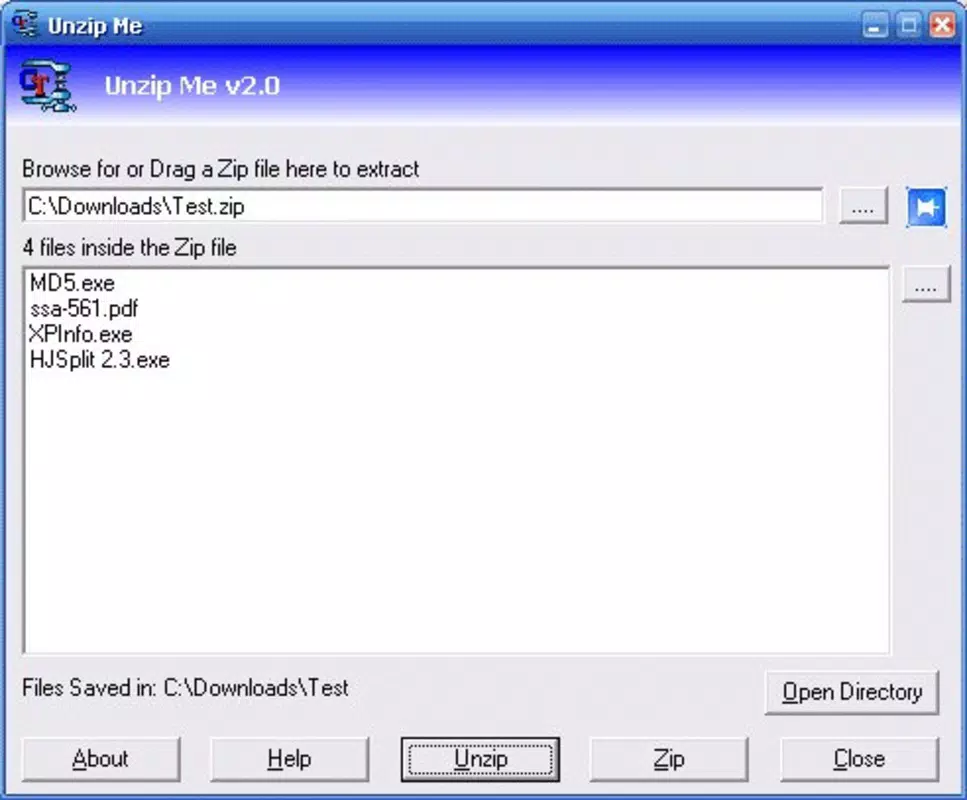
- Simple Interface: The application features a clean, uncluttered layout with minimal navigation options. This design reduces cognitive load and allows users to focus on the core task of zipping or unzipping files.
- Right-Click Integration: UnZip Me integrates with the Windows context menu, enabling users to compress or extract files with a single right-click. This feature enhances efficiency by eliminating the need to open the app for every task.
- Basic Compression Needs: The app supports standard ZIP file operations, including creating new archives and extracting contents. It handles various file types without complications, making it suitable for everyday use.
- Windows Compatibility: Designed for Windows 7 and earlier versions, the app ensures compatibility with older systems, though users on newer operating systems may face limitations.
For example, a user preparing a presentation can drag a folder containing slides, images, and notes into UnZip Me to create a single ZIP file for sharing. Similarly, someone downloading a software package can use the app to extract its contents quickly. These practical applications highlight its value as a utility tool for routine file handling.
Interface, UX & Performance
UnZip Me features a minimalistic interface with a clear layout focused on core file operations. The main window displays a file browser panel and a toolbar with basic actions such as “Add to ZIP” and “Extract.” Navigation is linear and intuitive, with no unnecessary menus or settings that could confuse new users. The visual style is functional rather than decorative, aligning with its utility-focused purpose.
Although the developer did not list formal performance metrics, the app’s small file size of 1.2 MB suggests it is optimized for low-resource environments. It is expected to load quickly and operate smoothly on systems with limited processing power or memory. Responsiveness appears consistent across different device categories, though specific testing data was not provided. Stability is likely maintained through its narrow scope of functionality, reducing the risk of crashes or bugs.
Users can expect a stable experience when performing basic zipping and unzipping tasks. However, the lack of detailed performance documentation means users should rely on real-world testing for confirmation. The app’s lightweight nature supports efficient operation even on older hardware.
Platform Compatibility & Technical Requirements
UnZip Me is designed for the Windows platform and is compatible with Windows 7 and earlier versions. The app’s file size is 1.2 MB, indicating a compact footprint ideal for systems with limited storage. The version number is 1.0, suggesting it is a stable initial release. The price is listed as free, making it accessible to a wide audience without financial barriers.
The developer did not specify minimum OS requirements beyond Windows 7, nor did they provide information about processor architecture or RAM needs. Compatibility with newer versions of Windows, such as Windows 10 or 11, was not confirmed. Users on updated systems may encounter installation or functionality issues, which could limit its usability for modern users. Additionally, the app is not available for mobile platforms, meaning it cannot be used on Android or iOS devices.
Pros and Cons
Pros
- Simple, intuitive interface ideal for beginners
- Right-click integration enhances workflow efficiency
- Lightweight file size (1.2 MB) ensures fast performance
- Free to download and use
- Effective for basic ZIP operations without complexity
Cons
- Compatibility limited to Windows 7 and earlier
- Not available on Android or iOS platforms
- Does not support advanced compression formats or password protection
- Limited technical documentation from the developer
- May not function on newer versions of Windows
FAQ
Is UnZip Me safe to download and install?
Yes, the app is free and available for download. It is designed to operate within standard Windows environments without requiring elevated permissions or system-level access.
Can I use UnZip Me on Windows 10 or Windows 11?
The app is officially compatible with Windows 7 and earlier. While some users may be able to run it on newer systems, compatibility is not guaranteed, and performance may vary.
Does UnZip Me support password-protected ZIP files?
Based on available information, the app does not appear to support password-protected archives. It focuses on basic zipping and unzipping tasks.
How do I update UnZip Me?
As of the current release, no automatic update mechanism is described. Users should check the official source for new versions or patches.
Is UnZip Me available for mobile devices?
No, the app is only available for Windows. It is not currently offered for Android or iOS devices.
Final Thoughts
UnZip Me delivers a focused, efficient solution for users who need to manage ZIP files without complexity. Its clean interface, right-click integration, and lightweight design make it a practical choice for basic file compression tasks. While its compatibility is limited to older Windows systems and it lacks advanced features, it excels in simplicity and accessibility. For individuals seeking a no-fuss tool to zip and unzip files quickly, UnZip Me offers a reliable and secure experience. It is especially valuable for users who prioritize ease of use over advanced functionality.
Download UnZip Me now


